Jewellery Costing & Quote Verification Tool
PRECISION VARIANCE ANALYSIS
Drop a quotation or sales order into one window and every metal, stone, setting and labour line is re-priced against your own master rates. Matches turn green, small gaps amber and real mistakes red, so wrong prices are caught before the customer sees them.
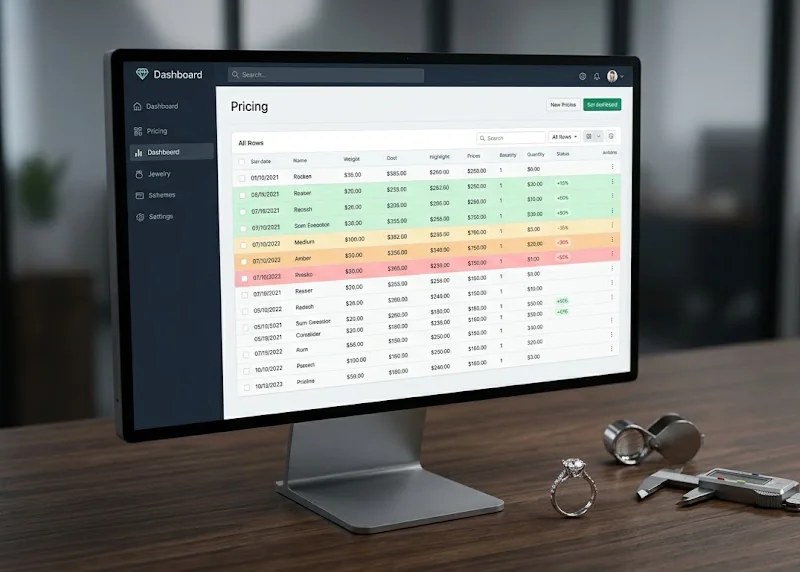
BOM Comparison
SO\26\A\118 · Northgate JewelsExport Highlighted Excel| Section | Code | Description | Template ($) | Master ($) | Diff (%) |
|---|---|---|---|---|---|
| Metal | G14 | 14K yellow gold | 284.27 | 284.27 | +0.0% |
| Stone | RD-LAB | Round lab-grown | 210.00 | 210.00 | +0.0% |
| Stone Setting | SET/PRONG | Prong setting | 18.00 | 16.80 | -6.7% |
| Labour (Others) | CAD/DESIGN | CAD design fee | 150.00 | 60.00 | -60.0% |
| Labour (Setting) | ENG/HAND | Hand engraving | 5.00 | N/A | — |
Built on top of their legacy system, not instead of it
The client already ran their business on an established jewellery ERP and its database. Replacing it wasn't an option, so we integrated with it: the tool connects to their existing database, reads the live rate masters and customer data, and acts as a validator that confirms the BOM variance on every quote before it goes out.
Legacy ERP & database
Their system of record, kept exactly as it is: rate charts, customer rates, metal loss % and orders.
Precision Variance Analysis
Re-prices every BOM line from those masters and checks the quote against them, line by line.
Verified quote
Every line marked OK, warning or over threshold, with a highlighted copy ready to send or fix.
- Read-only: nothing in their live ERP is ever changed
- No migration or new system for the team to learn
- New pricing masters in their database can be used without a software update
Stop re-checking quotes line by line
A single jewellery quote mixes gold at today's metal rate, stones priced by size band, setting charges and a handful of labour heads. Today someone checks each line against the rate chart by hand, and a wrong rate only gets noticed after the customer has it.
Before
- Every line re-priced by hand with a calculator and the rate chart
- Big sales orders with many designs take hours to review
- Nobody can say how a master price was worked out
- Pricing rules live in one person's head or a spreadsheet
After
- Every line priced from your master rates in seconds
- One tab per design, with problem designs highlighted
- A step-by-step breakdown behind every master price
- Pricing rules you can see and edit, per customer if needed
From quote file to verified prices in six steps
You bring the file; the tool finds the customer, pulls the rates and does the maths.
- ConnectPoint the app at your ERP database once and set the fallback rate chart and default metal loss %.
- Drop fileDrag in a quotation or sales order spreadsheet; each design in the file gets its own tab.
- Auto-priceThe customer is matched from the file and every line is re-priced from their rate chart, falling back to your base chart where they have no rate.
- ReviewLines turn green, amber or red by how far the quote is from master, with totals and counts for the whole design.
- Drill inDouble-click any line to see exactly how its master price was built, and fix the formula on the spot.
- ExportSave a copy of the original file with each problem cell coloured in, layout untouched.
One App, Three Jobs
Check every quote, control how prices are worked out, and look up rates and orders without opening the ERP.
CheckBOM Comparison
Drop a spreadsheet and every metal, stone, stone setting, setting labour, other labour, finding and chain line is compared with the master price. Lines within 5% are green, 5–15% amber, over 15% red, and lines with no master rate grey. A summary shows template total, master total, the difference and how many lines fall in each status.
Multi-Design Orders
Sales orders with many designs open as one tab per design, skipping the order summary sheet. Tabs with a real price difference are highlighted, and a search box narrows the list to the design you need.
Line Breakdown
Double-click any line to see each step of its master price: where every number came from, what was done to it and the running total. If the customer had no rate of their own, the line says it used the base chart.
Highlighted Export
Export writes a copy of the file you dropped in with each line's own cells filled in its status colour. A stone and its setting on the same row are coloured separately, so you can see which one is wrong.
Pricing Formulas
Each of the nine cost types (metal, diamond, colour stone, finding, per-piece labour, per-gram labour, diamond-weight labour, stone setting, chain) has a readable formula. Edit it with a step-by-step builder or as plain text, add an override for one customer, or reset to the built-in default.
Custom Variables
Point a new variable at any table and column in your ERP, choose how it matches each line, and it appears in every formula dropdown. New pricing masters can be used without a software update.
Costing Settings
Set the customer code (or let the app detect it from the file), a base rate chart to fill gaps, and a default metal loss %. The customer's own loss % is used whenever the ERP has one.
Customer Rate Card
Pick any customer and load every material and labour rate on file, with size or weight bands and per-piece or per-gram basis, in two tabs.
Order Pipeline
A live list of open quotations and sales orders with order date, expected delivery and value. Each one is marked Open, Overdue or Delivered, and you can filter by customer and type or include delivered orders.
See It Running
Realistic sample data. Every company, person and figure shown is fictional.
Line detail · G14
Metal · default formulaEdit formula…| Step | Source | Op | Operand | Running total |
|---|---|---|---|---|
| Metal rate | Quote line — LME (US$/troy oz) | start | 2,650.0000 | 2,650.0000 |
| Troy oz → gram | Constant | ÷ | 31.1035 | 85.1994 |
| Metal purity | Raw material master | × | 0.5833 | 49.6968 |
| Loss uplift | Customer loss % (10%) | × | 1.1000 | 54.6665 |
| Line weight | Quote line — weight (g) | × | 5.2000 | 284.2658 |
Pricing Formulas
stored locallyNew…| Component | Customer | Expression | Enabled |
|---|---|---|---|
| Metal | (default) | (lme / TROY_OZ) × purity × (1 + loss%) × weight | Yes |
| Diamond | (default) | stone rate × basis | Yes |
| Labour (per piece) | (default) | max(labour rate × qty, minimum) | Yes |
| ↳ override | NGJ-LGD | max(labour rate × qty, minimum) × 1.05 | Yes |
| Stone setting | (default) | max(setting rate × qty, minimum) | No |
Customer Rate Card
214 material · 38 labour ratesLoad Rate Card| Code | Description | Category | From | To | Rate |
|---|---|---|---|---|---|
| RD-LAB | Round lab-grown | D | 0.00 | 0.50 | 140.0000 |
| RD-LAB | Round lab-grown | D | 0.51 | 1.00 | 210.0000 |
| BAG-LAB | Baguette lab-grown | D | 2.00 | 4.00 | 95.0000 |
| EM-SAP | Emerald-cut sapphire | C | 0.00 | 2.00 | 60.0000 |
Order Pipeline
5 order(s)Refresh| Order No | Customer | Order Date | Exp. Delivery | Value (USD) | Status |
|---|---|---|---|---|---|
| SO\26\A\104 | Harbour Lane Gems | 02 Sep 2026 | 30 Sep 2026 | $18,420 | Overdue |
| SO\26\A\118 | Northgate Jewels | 21 Sep 2026 | 28 Oct 2026 | $9,640 | Open |
| QT\26\B\057 | Silverleaf Bridal | 03 Oct 2026 | — | $4,215 | Open |
| SO\26\A\089 | Crescent & Co. | 11 Aug 2026 | 15 Sep 2026 | $22,980 | Delivered |
| QT\26\A\212 | Harbour Lane Gems | 08 Oct 2026 | — | $1,375 | Open |
Built For Jewellery Makers
Jewellery manufacturers
Studded and diamond jewellery makers who quote from a rate chart.
Costing teams
People who check every quote before it goes out.
Sales & merchandising
Teams who need a customer's rates and order status fast.
Owners & managers
Leaders who want to stop margin leaking through wrong rates.
Why It Works
Reads your ERP, never changes it
The tool only reads rates from your existing ERP database. Formulas and settings are kept on your own PC, so nothing in your live system is touched.
Every number explained
Each master price comes with a step-by-step breakdown, so a red line can be argued with facts, not guesswork.
Your pricing rules, not ours
Pricing formulas are plain, editable rules with per-customer overrides. New pricing masters can be added as custom variables without new software.
Built for how jewellery is priced
It handles metal rate with purity and loss, stones by carat or millimetre size band, per-piece or per-gram labour, minimum charges and a fallback rate chart.
One file to install
It ships as a single Windows app. Point it at your database and drop in your first quote.
Find the wrong price before your customer does
Talk to Arboreal Labs about setting up quote verification on your own rate charts.
Get Started